
Reconnect an account that shows Disconnected
Open the creator in Creators and click Reconnect. VENUZ brings her back, or you log in again with the login app.
Before you start
- Who can do this
- Owners and Admins, or anyone with the Connect creators and Create creator links permissions. The first time the login app is used on a computer, someone with Approve a VENUZ login app approves it.
- You need
- A Windows or macOS computer, where the login app runs
Find her and click Reconnect#
- In the top bar, open Creators.
- Click the creator in the table. Her row says Disconnected.
- In the OnlyFans box at the top of her page, click Reconnect.
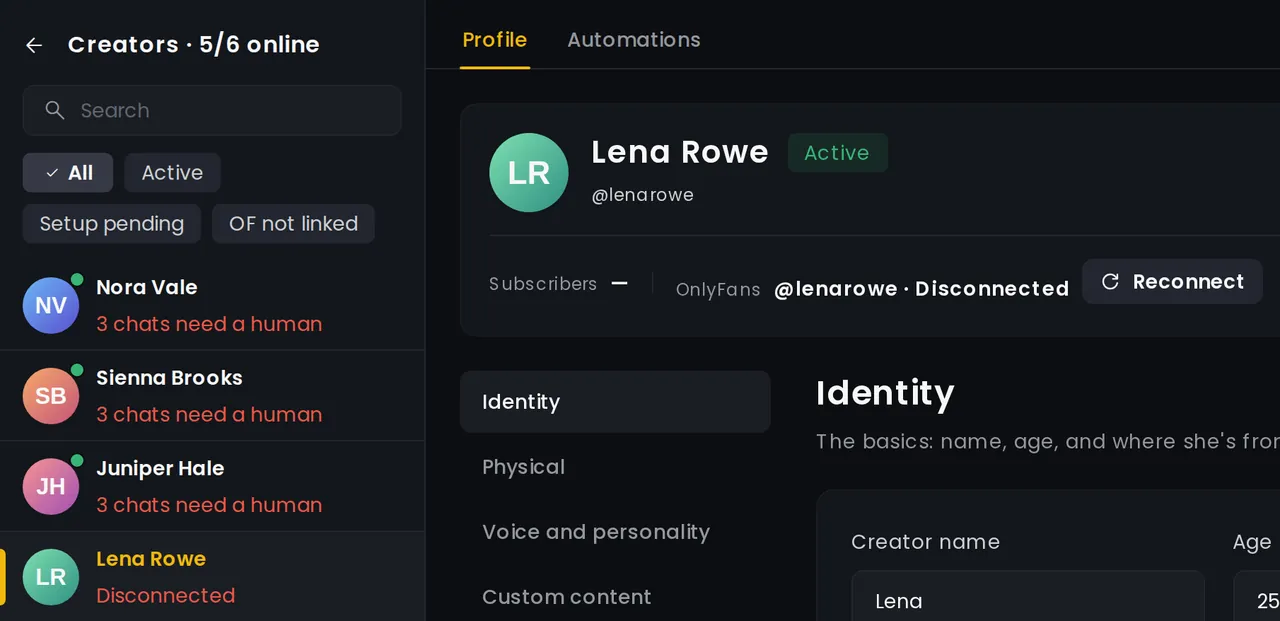
VENUZ brings her back, or asks for a new login#
- If VENUZ can bring the account back, it does. The box shows that she is connecting, then her username with a check mark. You’re done.
- If it needs a new OnlyFans login, the Reconnect OnlyFans account window opens instead. Carry on with the login app.
Log in again (OnlyFans no longer accepts the login) and Disconnected after someone clicked Disconnect always need a new login with the login app. Only a plain Disconnected can come back without a new login.
Log in again with the login app#
- In the window, click Open login app.The VENUZ login app opens on your computer.
- In the login app, find her and click Connect.
- An OnlyFans window opens. Log in with her OnlyFans email and password, and enter any code OnlyFans asks for.
- When the login finishes, the login app shows her as Connected.In VENUZ, the window closes and the OnlyFans box shows her username with a check mark.
In the window, click Download for Windows or Download for macOS, install it and open it. One login app connects all your creators.
The login app shows Connect your account. Click Connect, then click Approve on the page that opens in your browser. Log in to VENUZ there if it asks.
Good to know#
Calypso may have turned off while she was disconnected. It turns off right away if someone disconnected her, or after more than 60 minutes showing Log in again. It stays off when she reconnects, so turn it back on.
Log in to this creator’s own OnlyFans account, not another one.
Common questions#
Turn Calypso back on for her
OnlyFans asks for a face check
The creator does it on her phone, in the browser or in the Venuz Verify app. See Complete OnlyFans’ face check.
The window says This link expired
Click Create a new login link.
VENUZ shows Connection failed
It shows when the window is closed before the login finishes. Click Retry to try again.
VENUZ says Your VENUZ login app is out of date
Click Download the latest version, install it and open it again.
Why she disconnected
What happens while she is disconnected
Where to go next
Couldn’t send that. Try again.
Still stuck?
Write to us and a person from the VENUZ team answers. Tell us the creator and what you were trying to do.