
Net and gross: why a number differs from OnlyFans
Most differences come from Net versus Gross, the time zone days are counted in, or a period that isn’t over.
An earnings figure in VENUZ doesn’t match the one you see in OnlyFans, or two VENUZ pages show different amounts for the same period.
What to check#
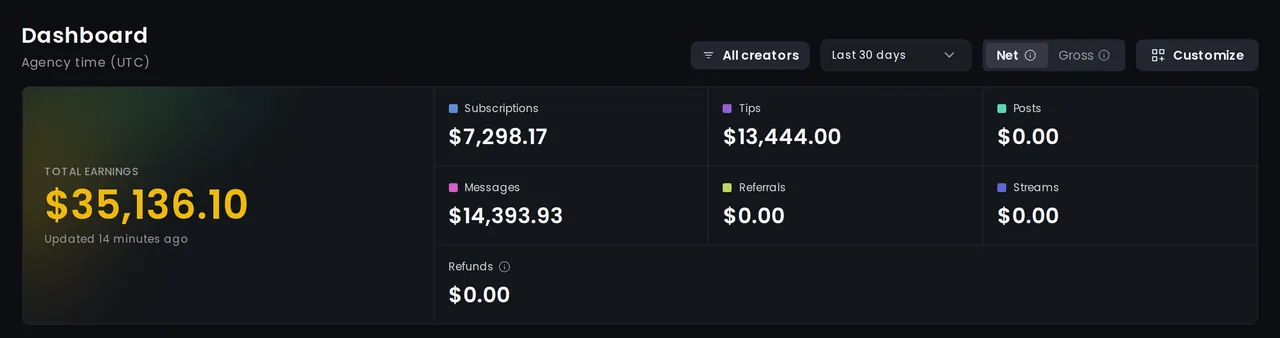
- Net or Gross. Net is what the creators keep after OnlyFans’ 20% fee. Gross is what fans paid. Check the switch next to Period on the Dashboard or in Analytics → Earnings, and compare it with the same kind of figure in OnlyFans. Some figures always use one of them: mass message earnings are what fans paid, while Monthly goals and the Calypso leaderboard are net. On the Dashboard, the change against the previous period is always net too.
- The time zone. VENUZ counts each day in your agency’s time zone, named as Agency time under the Dashboard title. A day in another time zone starts and ends at different hours, so the same date can hold different sales. On the Dashboard’s Creators card, columns marked (UTC) come from OnlyFans in UTC days.
- A period that isn’t over. Today’s figures count the sales so far and keep growing until midnight, agency time.
- The creators picked. Most figures follow the creator picker. On the Dashboard, Right now, Action items, Monthly goals and Your Calypso rank always cover the whole agency. Check that the picker shows the same creators as the page you’re comparing with.
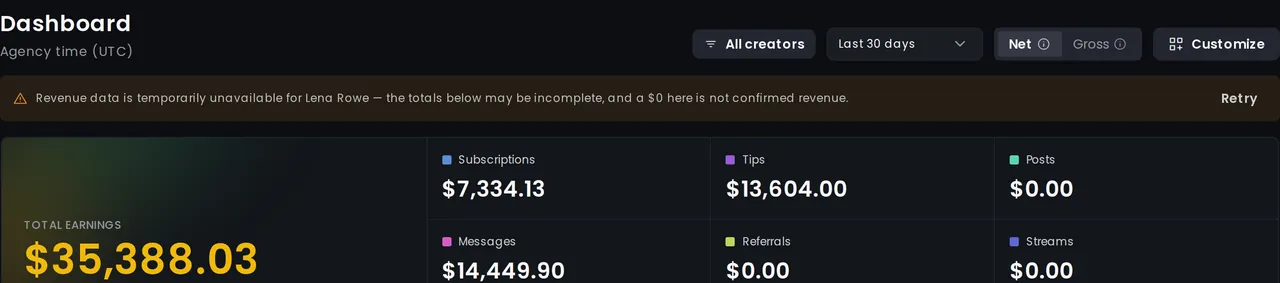
- A figure that isn’t confirmed. — means VENUZ couldn’t confirm the figure. VENUZ never shows a $0 it doesn’t know. If an amber notice says the totals may be incomplete, some creators’ earnings couldn’t load. On the Dashboard, click Retry. In Analytics → Earnings, reload the page in a minute.
- A part compared with the whole. Calypso earnings and Team sales count only PPVs unlocked and tips in chat, so they’re less than Total earnings. Subscriptions, renewals, streams and referrals belong to nobody. Team sales also leave out PPVs sent from outside VENUZ or in mass messages. See What counts as a Calypso sale.
- Refunds. The money returned to fans through OnlyFans refunds and bank chargebacks shows on its own card. It’s Refunds on the Dashboard and Refunds & chargebacks in Analytics → Earnings. Check whether the OnlyFans figure you’re comparing with takes them off.
- Fan counts. Fan growth shows new subscribers and renewals only. Ended subscriptions aren’t shown, because OnlyFans doesn’t report them.
When you contact us, include the creator, the period, whether you used Net or Gross, and both numbers.
Where to go next
Overview · 3 min readRead your earningsOverview · 4 min readThe Dashboard at a glanceOverview · 2 min readWhat counts as a Calypso sale
Did this answer your question?
Sorry about that. What went wrong?
Couldn’t send that. Try again.
Still stuck?
Write to us and a person from the VENUZ team answers. Tell us the creator and what you were trying to do.